Helpdesk: A full ticketing system built into WarmDesk
The helpdesk module brings a full ticketing system into WarmDesk without requiring a second application. Tickets live alongside your Kanban boards, time sheets, and customer contracts — same login, same team, same data.
Ticket list
Every ticket belongs to a customer. Navigate to a customer and open the Tickets tab to see the full list filtered by that customer.
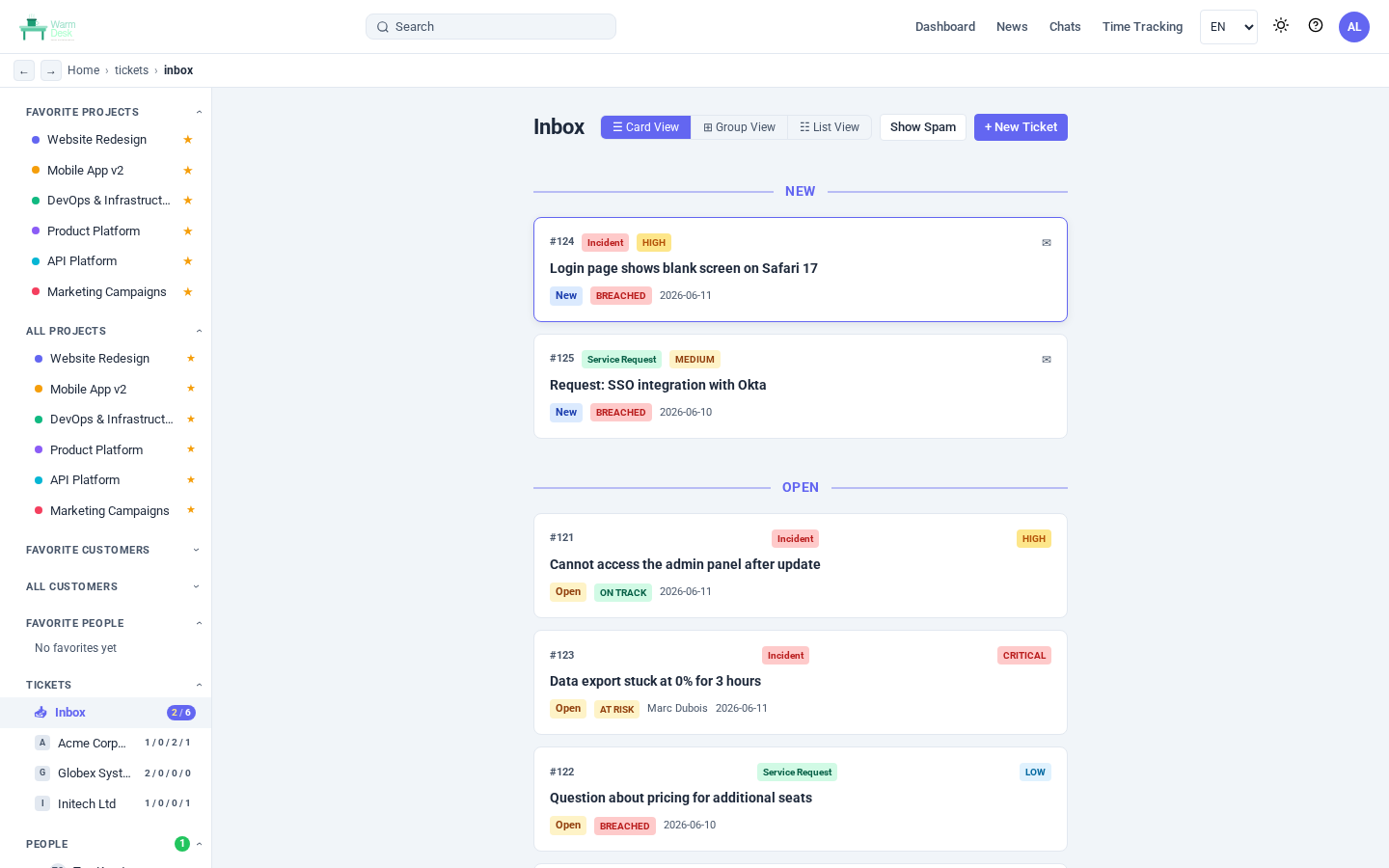
The list shows status, priority, type, assignee, SLA badge, and the last-updated timestamp at a glance. Tickets with an SLA policy attached carry a colour-coded badge: green when on track, amber when the deadline is within an hour, red when breached.
Ticket detail
Click any ticket to open the full detail view.
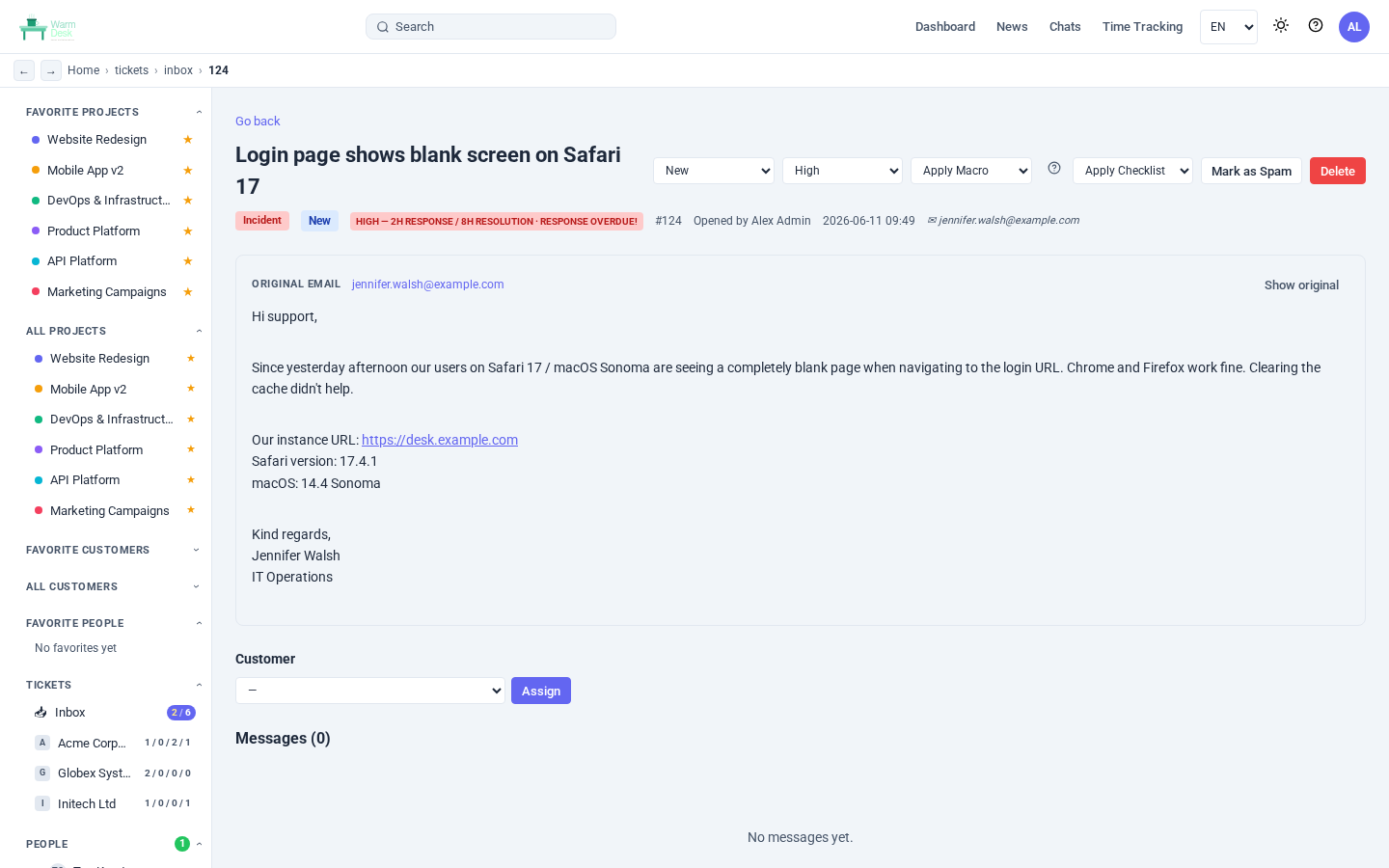
The detail view covers everything in one page:
Title — double-click to edit in place.
Status — open / in progress / pending reminder / resolved / closed.
Priority — low / medium / high / critical.
Type — incident, problem, service request, or request for change.
Assignee and owner — picked from the customer’s direct members.
Group — route to a whole support group instead of (or in addition to) an individual.
Tags — free-form labels, add with Enter or comma.
Description — rendered Markdown with inline code, lists, and block quotes.
Attachments — upload files or paste images directly from the clipboard.
SLA card — response and resolution deadlines with a live breach indicator.
Linked tickets — relate tickets by ID (e.g. root-cause and duplicates).
Linked board cards — connect a ticket to the Kanban card tracking the fix.
Time logged — log hours directly on the ticket (when time tracking is enabled).
Internal messages — threaded Markdown replies with attachment support.
Ticket types and priority
Four ticket types map to common ITIL categories:
| Type | Typical use |
|---|---|
Incident | Something is broken and impacting users right now. |
Problem | The root cause behind one or more incidents. |
Service request | A standard request (access, configuration, new user). |
Request for change | A planned change that needs review and approval. |
Priority drives SLA matching: every active SLA policy can be scoped to one or more priority levels.
A critical incident can therefore get a 30-minute response deadline while a low service request gets four hours — configured once in the admin panel, applied automatically to every new ticket.
SLA policies
Admins define SLA policies under Admin → SLA Policies. Each policy has:
Response time — minutes until a first reply is required.
Resolution time — minutes until the ticket must be closed.
Priority filter — comma-separated list of priorities this policy applies to (leave blank to match all).
When a ticket is created, WarmDesk finds the active policy that matches the ticket’s priority and stamps sla_response_deadline and sla_resolution_deadline on the record.
Breach status is recalculated in real time on every list and detail load, so there is no cron job to configure.
Pending reminder
Set a ticket to Pending reminder status to pause the SLA clock while waiting on a third party. A date picker appears in the header; tickets with a reminder due today or earlier float to the top of the list.
Time tracking on tickets
When a user has time tracking enabled, a Time Logged section appears in the ticket detail view.
Select a date, enter hours and minutes, optionally pick one of the customer’s projects, add a short note, and click Log time. Entries are saved as standard time entries linked to both the ticket and the customer, so they appear in the regular time reports alongside board-based work.
Dashboard default
Users who primarily work in the helpdesk can set Settings → Dashboard shows to Tickets (helpdesk). After login they are sent directly to the ticket list for their starred customer instead of the project boards. The dashboard news widget still appears at the top of the ticket list so announcements are never missed.
Access control
Helpdesk access is controlled per user via the helpdesk_enabled feature flag.
Admins always have full access regardless of the flag.
Ticket visibility is scoped to the customer: a user must have at least a member role on the customer (direct or via group) to see and interact with that customer’s tickets.
Ansible automation
Three new modules ship in ansilabnl.warmdesk v0.4.0:
ansilabnl.warmdesk.ticketCreate, update, and close tickets from playbooks or CI pipelines.
ansilabnl.warmdesk.sla_policyManage SLA policies (admin only) — useful for initial provisioning.
ansilabnl.warmdesk.user_credentialToggle feature flags per user, including
helpdesk_enabledandtime_tracking_enabled.
Example — open a ticket when a deployment fails:
- name: Open incident ticket on deployment failure
  ansilabnl.warmdesk.ticket:
    warmdesk_url: "{{ warmdesk_url }}"
    warmdesk_api_key: "{{ warmdesk_api_key }}"
    customer_id: "{{ customer_id }}"
    title: "Deployment failed — {{ ansible_date_time.date }}"
    type: incident
    priority: high
    description: |
      Automated deployment to production failed.
      See the pipeline log for details.
    state: present
  register: incident
Upgrade
The helpdesk module is part of WarmDesk v0.10.17. Database columns are added automatically on first boot via GORM AutoMigrate — no manual migration required.
Download from the download page or pull the latest release tag.