v0.12.1: MFA device trust, timesheet polish, and reliable reverse-proxy login
WarmDesk v0.12.18 rounds out the MFA trusted-devices feature with an admin policy, polishes the undeclarable-time weekly sheet, and fixes auth cookies so login works behind a reverse proxy on plain HTTP.
This post covers both v0.12.0 and v0.12.1 — the patch release landed the same day and tightens up items introduced in the minor release.
MFA trusted devices (v0.12.0)
Users with TOTP enabled no longer need to reach for their authenticator app on every login from a machine they control.
After entering a valid six-digit code, the MFA step offers a Remember this device checkbox with two durations:
1 week — trust expires after seven days.
1 month — trust expires after thirty days.
The trust token is stored server-side as a SHA-256 hash and delivered to the browser as an httpOnly, SameSite=Strict cookie. Subsequent logins from the same browser skip the MFA prompt until the trust expires.
Managing trusted devices
Open Settings → Security → Trusted Devices to see every active trust record: device label, last-used timestamp, and expiry date. Revoke individual devices or clear them all in one click. Logging out automatically revokes the trust for the current device.
Passkey sign-in honours the same trust mechanism — a trusted device with a registered passkey can sign in without a TOTP challenge.
Tauri desktop
The desktop app cannot use httpOnly cookies for MFA trust, so it stores the trust token in sessionStorage instead.
The same admin policy and expiry rules apply; revoking a device from Settings invalidates the stored token on the next login attempt.
MFA remember-devices admin policy (v0.12.1)
Trusted devices are convenient, but not every organisation wants them enabled. Admin → Settings → Security now includes a Remember MFA on trusted devices control with three options:
| Policy | Effect |
|---|---|
Disabled | The remember checkbox is hidden on the MFA step. Existing trusts are revoked when the policy is saved. Every login requires a fresh TOTP code. |
Allow for 1 week only | Users can trust a device for seven days. Thirty-day trusts are revoked automatically when this policy is applied. |
Allow for 1 week or 1 month | Both durations are available (default). |
Tightening the policy purges trusts that no longer comply — for example, switching from 1 week or 1 month to 1 week only revokes every thirty-day trust immediately. Passkey login and the Tauri desktop client read the same policy; there is no separate desktop override.
Undeclarable time on the weekly sheet (v0.12.1)
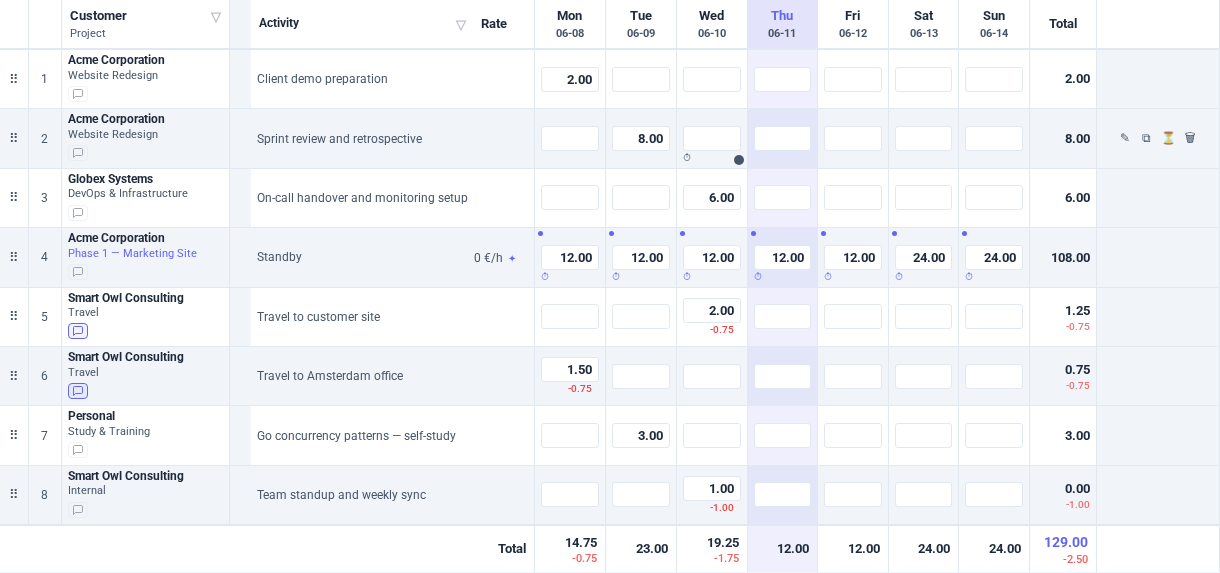
Projects with an undeclarable minutes value (see the undeclarable-time blog post) subtract non-billable time from every entry when totals are calculated. The weekly sheet received a focused UX pass:
Red undeclarable amounts in day cells now right-align with the entered time value.
Row totals show declarable time — the same figure the footer uses — so you no longer have to mentally subtract undeclarable minutes from the row sum.
The
-prefix is used consistently in the UI and in PDF grid exports.Screen readers hear the deduction via
aria-describedbyon day inputs that carry undeclarable time.
The per-row ? help icon has been removed; undeclarable-time guidance now lives in the page-level help panel (the ? button in the top-right of the time-tracking view).
Page help improvements
The time-tracking sheet help entry now resolves correctly when an i18n key returns an array of paragraphs. The help modal body scrolls when content overflows, and the undeclarable-time section explains the difference between logged time and declarable totals.
Grid PDF formatting (v0.12.0)
Week, month, and year grid PDF exports now respect two user preferences that were previously ignored:
Date format — the week period label and year print date follow the user’s date/time format setting instead of always using DD-MM(-YYYY).
Time notation — cell values, row totals, and undeclarable rows render in decimal or
hh:mmaccording to the user’s time notation preference.
Auth cookies behind a reverse proxy (v0.12.1)
WarmDesk sets auth cookies (access_token, refresh_token, MFA trust) with the Secure flag when the connection is considered HTTPS.
Previously, release mode always forced Secure, which broke login on plain HTTP — including local E2E test runs and deployments where TLS terminates at a reverse proxy and the backend sees unencrypted traffic.
Secure is now set only when:
The request arrived over direct TLS (
c.Request.TLS != nil), orThe upstream proxy sent
X-Forwarded-Proto: https.
If you terminate TLS at nginx or Apache and proxy to WarmDesk on HTTP, make sure your proxy passes the header:
proxy_set_header X-Forwarded-Proto $scheme;The nginx and Apache templates in the deploy/ directory include this header, and warmdesk.yaml.example documents the requirement.
Upgrade
Download v0.12.18 from the download page or pull the latest release tag.
No manual database changes are required. New columns and settings are applied automatically on first boot via GORM AutoMigrate and the system-settings loader.